
Compt: Professional Development Pro™ Recommendations Page - Admins
The Recommendations Page is an optional feature within Professional Development Pro™ that allows employees to share reviews of the courses, certifications, and learning experiences they’ve used their professional development funds on. When enabled, it creates a shared knowledge space where employees can see what others are learning and decide which opportunities may be most valuable for their own development.
This feature helps companies encourage knowledge sharing across teams while making it easier for employees to identify worthwhile learning opportunities. If your organization would like to enable the Recommendations Page, you can contact your Compt Customer Success Manager or reach out to support@compt.io.
OVERVIEW
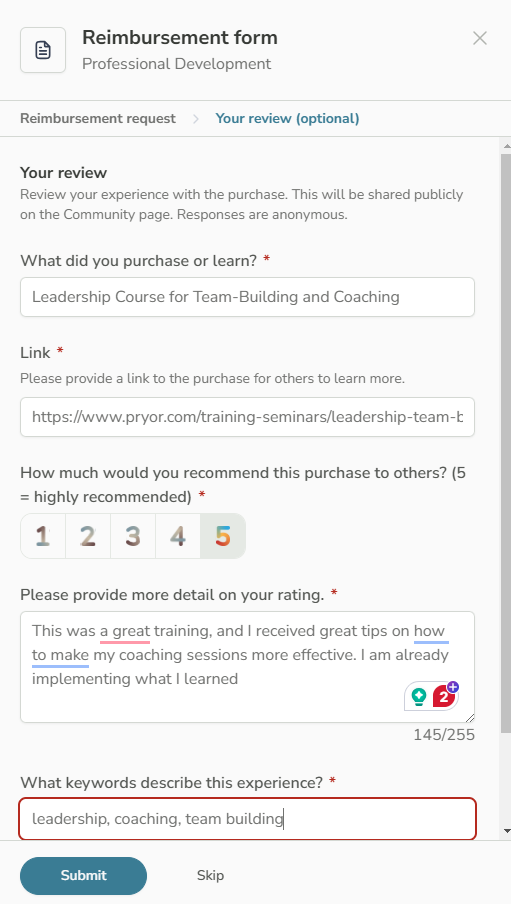
The Recommendations Page allows employees to review and discover professional development experiences directly within Compt. When employees submit a claim for a professional development expense, they are prompted to leave an optional review of the learning experience.
These reviews appear in a shared activity feed that employees can browse, search, and interact with. This helps build an internal knowledge base of learning resources that other employees may find valuable.
WHEN TO USE
Admins may want to enable the Recommendations Page when they want to:
- Encourage knowledge sharing around professional development resources
- Help employees identify useful courses, certifications, and learning programs
- Increase engagement with the Professional Development Program
- Provide employees with peer-driven recommendations for learning opportunities
BEFORE YOU START
- Your company must be using Professional Development Pro™.
- The Recommendations Page is an optional feature that must be enabled by Compt.
- Employees must submit a professional development claim in order to leave a review.
HOW IT WORKS
- An employee submits a claim for a professional development expense.
-
During the submission process, the employee is prompted to leave an optional review of the course, certification, or learning experience.
- The review is added to the Recommendations activity feed in Compt.
-
Employees can click the Recommendations tab in the left sidebar to browse the feed.
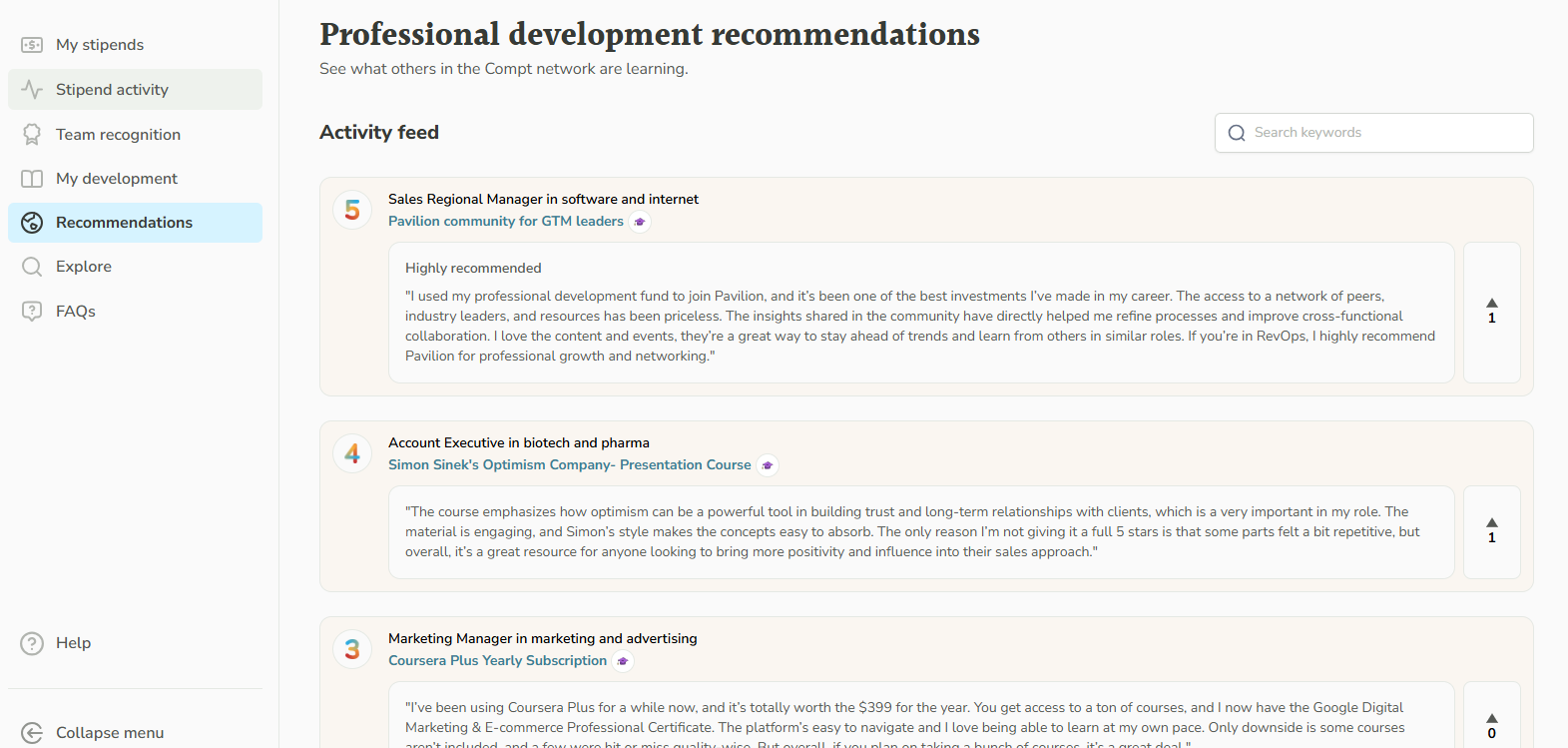
- Employees can search reviews by keyword or filter by industry to find relevant learning experiences.
- Employees can interact with reviews using three reaction emojis: like, love, or insightful.
WHAT HAPPENS NEXT
- Reviews become part of a shared knowledge feed that employees across the company can explore.
- Over time, this creates a library of peer-recommended learning opportunities.
- Employees can use these insights to choose professional development programs that are more likely to benefit their roles and career growth.
If your organization would like to add the Recommendations Page, contact your Compt Customer Success Manager or email support@compt.io.
TROUBLESHOOTING
If employees cannot see the Recommendations Page, the feature may not be enabled for your company. Contact support@compt.io or your Compt Customer Success Manager to confirm availability.
FAQS
Q: Is the Recommendations Page required to use Professional Development Pro™?
A: No. The Recommendations Page is an optional feature that companies can choose to enable.
Q: Do employees have to leave a review when submitting a claim?
A: No. Leaving a review is optional.
Q: Who can see the reviews?
A: Reviews appear in the shared Recommendations activity feed for employees within your company.