
Compt: Correcting a Stipend - Admins
Admins can make a stipend funding correction in Compt when an Employee’s stipend balance needs to be adjusted. This may be needed if an Employee received an incorrect stipend amount or used stipend funds outside of the Compt platform.
Stipend funding corrections can add funds to a stipend balance or subtract funds from a stipend balance. This feature should only be used to correct stipend balances, not to issue spot bonuses.
OVERVIEW
Compt is a platform employers use to manage stipends, reimbursements, and Business Expense programs for Employees. A stipend is a set amount of money your company provides for eligible expenses.
A stipend funding correction allows Admins to adjust stipend funds for one or more Employees when a balance needs to be corrected. Admins can select the Employee, choose the stipend, enter the correction amount, select whether to add or subtract from the balance, provide a reason, and choose whether to notify the Employee.
WHEN TO USE
Use this process when:
- An Employee received an incorrect stipend amount
- An Employee used stipend funds outside of Compt
- One or more Employee stipend balances need to be corrected
- You need to adjust stipend funding for administrative accuracy
Do not use this process to give spot bonuses. Use the separate spot bonus option instead.
BEFORE YOU START
Before making a stipend funding correction, confirm that:
- You have Admin access in Compt
- The Employee already exists in the Team list
- You know which Employee or Employees need the correction
- You know which stipend needs to be corrected
- You know whether the correction should add to or subtract from the stipend balance
- You know the correction amount
- You have a reason for the correction
- You know whether the Employee should be notified
HOW TO
To make a stipend funding correction:
- Log into Compt.
- Click Stipend admin or Expense admin on the left-hand side, then Team.
- Find the Employee who needs a stipend funding correction.
- Check the box next to the Employee’s name.
- If you need to correct funding for multiple Employees, check the box next to each Employee’s name.
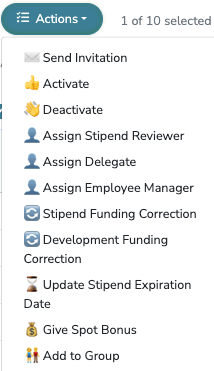
- Click Actions.
- Click Stipend Funding Correction.
- Review the selected Employee(s).
- Use the stipend dropdown to select the stipend that needs to be corrected.
- Select Add to balance or Subtract from balance.
- Enter the correction amount.
- Enter the reason for the correction in the description field.
- Check or uncheck Notify Team Member.
- Click Confirm Correction.
- Confirm the correction has been applied.

WHAT HAPPENS NEXT
After you click Confirm Correction, the selected Employee’s stipend balance is updated based on the correction details entered.
If Notify Team Member is checked, the Employee is notified about the correction. If it is unchecked, the correction is applied without notifying the Employee.
Do not use stipend funding corrections for spot bonuses. If an Employee should receive a spot bonus, use the separate spot bonus option in Compt.
TROUBLESHOOTING
If you do not see Stipend Funding Correction under Actions:
- Confirm you have Admin access in Compt
- Confirm you selected at least one Employee from the Team list
- Confirm your role has permission to make stipend funding corrections
If the wrong Employee was selected:
- Cancel the correction before clicking Confirm Correction
- Return to the Team list
- Select the correct Employee
If the wrong stipend was selected:
- Do not click Confirm Correction
- Use the stipend dropdown to select the correct stipend
If the correction amount is incorrect:
- Do not click Confirm Correction
- Update the correction amount before confirming
If you need to give a spot bonus:
- Do not use Stipend Funding Correction
- Use the separate spot bonus option instead
FAQS
Q: When should I use a stipend funding correction?
A: Use a stipend funding correction when an Employee’s stipend balance needs to be corrected, such as when they received an incorrect stipend amount or used stipend funds outside of Compt.
Q: Can I make a correction for multiple Employees?
A: Yes. You can select one or more Employees from the Team list before clicking Actions and selecting Stipend Funding Correction.
Q: Can I add funds to a stipend balance?
A: Yes. Select Add to balance when entering the correction details.
Q: Can I subtract funds from a stipend balance?
A: Yes. Select Subtract from balance when entering the correction details.
Q: Can I notify the Employee about the correction?
A: Yes. Check Notify Team Member if the Employee should be notified about the correction.
Q: Should I use this feature to give a spot bonus?
A: No. Stipend funding corrections should not be used for spot bonuses. Compt has a separate option for spot bonuses.
Q: Where do I start a stipend funding correction?
A: Go to Team, select one or more Employees, click Actions, and choose Stipend Funding Correction.